 Candelina
Make a Birthday Card on iPhone
By Candelina · Updated
Turn a birthday greeting into a card in Candelina. Preview the text, then share the card as an image or save it to Photos.
Step by step
- Choose the person, open the greeting composer, and select or edit a draft. Check the name and wording before turning it into a card.
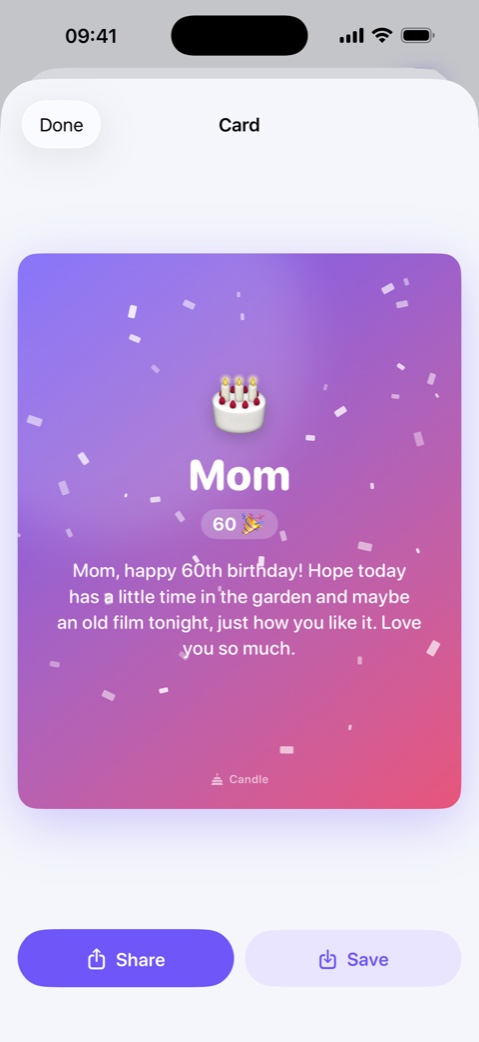
- Open the card preview. Read the complete message in the card layout, including the sender name and any age shown.
- Use Share to choose a messenger and recipient yourself, or Save to keep the image in Photos.
- If saving is blocked, review Candelina’s Photos permission in iPhone Settings. Return to the card and try again after granting access.
What to know
The card preview is free. Saving or sharing the image requires Unlimited. The card is rendered on your phone; cloud AI is a separate, optional step for writing the text. Nothing is sent to a recipient until you share it.
A practical example
For a card that feels personal, keep the greeting short enough to read comfortably and add one real detail. Check the preview again after editing: a paragraph that works in chat may feel crowded on an image.
Related guides
Write a Personal Birthday Message with AI
Write a birthday message using a real detail about the person, the right tone and their language. Review the draft before sending it yourself.
Belated Birthday Wishes: What to Say
Missed a birthday? Write a short apology and a personal wish, then use Candelina’s missed-birthday list to catch up on the past week.
Birthday Widgets for Your iPhone Screens
Put upcoming birthdays on your iPhone Home Screen or Lock Screen with Candelina widgets. Choose a layout and check the displayed person.