 Candelina
Write a Personal Birthday Message with AI
By Candelina · Updated
Write a birthday message using a real detail about the person, the right tone and their language. Review the draft before sending it yourself.
Step by step
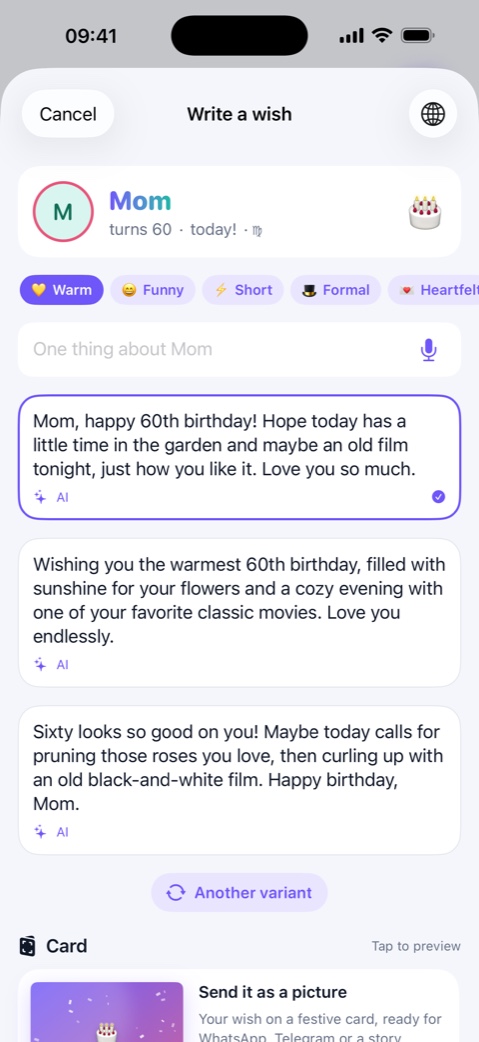
- Open the person in Candelina and start composing a greeting. Check the recipient’s language rather than relying only on the automatic guess.
- Choose a tone that suits the relationship: warm, funny, short, formal, heartfelt or conversational.
- Add one specific detail, such as a recent move or a shared hobby. You can type it or dictate it. Avoid details you would not want included in the message.
- Read the suggested drafts, correct any assumptions, and edit the wording until it sounds like you. Send it from your own messenger.
What to know
Offline templates work without cloud AI. Cloud drafts need consent and send the disclosed greeting details to the service. The free AI allowance covers one person per year; Unlimited extends AI wishes to everyone. Candelina does not send messages automatically.
A practical example
Instead of “make it personal”, try “we hike together and she just adopted a dog”. A useful draft might wish her a year of good trails and muddy paws; remove that joke if it does not suit your relationship.
Related guides
Belated Birthday Wishes: What to Say
Missed a birthday? Write a short apology and a personal wish, then use Candelina’s missed-birthday list to catch up on the past week.
Make a Birthday Card on iPhone
Turn a birthday greeting into a card in Candelina. Preview the text, then share the card as an image or save it to Photos.
Collect Friends’ Birthdays with One Link
Collect birthdays through a shared link instead of asking each friend separately. Bring the replies into your Candelina birthday list.